---
title: AIDIN-hand TCP/IP Communication Manual
description: AIDIN Hand TCP/IP Communication Manual
---
[Skip to content](https://help.aidinrobotics.co.kr/en/aidin-hand-tcp/ip-communication-manual#main-content)
- [English](https://help.aidinrobotics.co.kr/en/aidin-hand-tcp/ip-communication-manual)
- [한국어 - 대한민국 (Korean - South Korea)](https://help.aidinrobotics.co.kr/aidin-hand-tcp/ip-통신-매뉴얼)
English
Show submenu for translations
[](https://help.aidinrobotics.co.kr/?hsLang=en)
- [Full Manual](https://help.aidinrobotics.co.kr/en/full-manual)
- [Install Guide](https://help.aidinrobotics.co.kr/en/install-guide)
- [Contact Us](https://www.aidinrobotics.co.kr/en/contact)
Open main navigation
Close main navigation
- [Full Manual](https://help.aidinrobotics.co.kr/en/full-manual)
- [Install Guide](https://help.aidinrobotics.co.kr/en/install-guide)
- [Contact Us](https://www.aidinrobotics.co.kr/en/contact)
- - [English](https://help.aidinrobotics.co.kr/en/aidin-hand-tcp/ip-communication-manual)
- [한국어 - 대한민국 (Korean - South Korea)](https://help.aidinrobotics.co.kr/aidin-hand-tcp/ip-통신-매뉴얼)
English
Show submenu for translations
- [Official Site](https://www.aidinrobotics.co.kr/en)
[Official Site](https://www.aidinrobotics.co.kr/en)
How can we help you?
- There are no suggestions because the search field is empty.
1. [AIDIN ROBOTICS Knowledge Base](https://help.aidinrobotics.co.kr/en?hsLang=en)
2. [Install Guide](https://help.aidinrobotics.co.kr/en/install-guide?hsLang=en)
January 29, 2026
# AIDIN-hand TCP/IP Communication Manual
### **Overview**
- AIDIN-hand can be controlled from the high-level controller via TCP/IP communication.
- AIDIN-hand is a server node, and the provided example code is a client node.
### **TCP/IP communication information**
- Port number: 8000
- Buffer size: 2048
- JSON data types
- KEY and VALUE information
- **Hand command information (received value based on hand)**
- **hand\_mode”** : v1 (data type: uint16\_t)
\> operating mode setting variable
- **“maxtorque”** : v1 (data type: uint16\_t)
\> maximum output current setting variable
- **“hand\_TP\_cmd”** : {v1, v2, v3, v4, v5, v6, v7, v8, v9, v10, v11, v12, v13, v14, v15} (data type: int\[15\])
\> position control setting value based on motor encoder value
\> v1, v2, v3: Thumb 1,2,3 motor encoder values / v4, v5, v6: Index finger 1,2,3 motor encoder values / v7, v8, v9: Middle finger 1,2,3 motor encoder values / v10, v11, v12: Ring finger 1,2,3 motor encoder values / v13, v14, v15: little finger 1,2,3 motor encoder values
- **“hand\_joint\_cmd”** : {v1, v2, v3, v4, v5, v6, v7, v8, v9, v10, v11, v12, v13, v14, v15, v16, v17, v18, v19, v20} (data type: double\[20\])
\> position control setting value based on finger joint angle value (radians)
\> v1, v2, v3, v4: Thumb q1, q2, q3, q4 joint angle values / v5, v6, v7, v8: Index finger q1, q2, q3, q4 joint angle values / v9, v10, v11, v12: Middle finger q1, q2, q3, q4 joint angle values / v13, v14, v15, v16: Ring finger q1, q2, q3, q4 joint angle values / v17, v18, v19, v20: little finger q1, q2, q3, q4 joint angle values
(q3, q4 are coupled, so only q3 value needs to be entered)
- **“hand\_taskspace\_cmd”** : {v1, v2, v3, v4, v5, v6, v7, v8, v9, v10, v11, v12, v13, v14, v15} (data type: double\[15\])
\> position control setting value based on fingertip coordinate val.
\> v1, v2, v3: Thumb x, y, z fingertip coordinates / v4, v5, v6: Index finger x, y, z fingertip coordinates / v7, v8, v9: Middle finger x, y, z fingertip coordinates / v10, v11, v12: Ring finger x, y, z fingertip coordinates / v13, v14, v15: little finger x, y, z fingertip coordinates
- **“hand\_TT\_cmd”** : {v1, v2, v3, v4, v5, v6, v7, v8, v9, v10, v11, v12, v13, v14, v15} (data type: int\[15\])
\> Current control setting value
\> v1, v2, v3: Thumb 1,2,3 motor current value / v4, v5, v6: Index finger 1,2,3 motor current value / v7, v8, v9: Middle finger 1,2,3 motor current value / v10, v11, v12: Ring finger 1,2,3 motor current value / v13, v14, v15: little finger 1,2,3 motor current value
- **Hand position/current/sensor data information**
**(transmission value based on hand)**
- **“motor\_pos”** : {v1, v2, v3, v4, v5, v6, v7, v8, v9, v10, v11, v12, v13, v14, v15} (data type: int32\_t\[15\])
\> encoder values for each finger motor
\> v1, v2, v3: Thumb 1,2,3 motor encoder values / v4, v5, v6: Index finger 1,2,3 motor encoder values / v7, v8, v9: Middle finger 1,2,3 motor encoder values / v10, v11, v12: Ring finger 1,2,3 motor encoder values / v13, v14, v15: little finger 1,2,3 motor encoder values
- **“joint\_pos”** : {v1, v2, v3, v4, v5, v6, v7, v8, v9, v10, v11, v12, v13, v14, v15, v16, v17, v18, v19, v20} (data type: double\[20\])
\> joint angle value for each finger (radians)
\> v1, v2, v3, v4: Thumb q1, q2, q3, q4 joint angle values / v5, v6, v7, v8: Index finger q1, q2, q3, q4 joint angle values / v9, v10, v11, v12: Middle finger q1, q2, q3, q4 joint angle values / v13, v14, v15, v16: Ring finger q1, q2, q3, q4 joint angle values / v17, v18, v19, v20: little finger q1, q2, q3, q4 joint angle values
- **“task\_space\_pos**” : {v1, v2, v3, v4, v5, v6, v7, v8, v9, v10, v11, v12, v13, v14, v15} (data type: double\[15\])
\> coordinates of each fingertip
\> v1, v2, v3: Thumb x, y, z fingertip coordinates / v4, v5, v6: Index finger x, y, z fingertip coordinates / v7, v8, v9: Middle finger x, y, z fingertip coordinates / v10, v11, v12: Ring finger x, y, z fingertip coordinates / v13, v14, v15: little finger x, y, z fingertip coordinates
- **“current\_state”** : {v1, v2, v3, v4, v5, v6, v7, v8, v9, v10, v11, v12, v13, v14, v15} (data type: int16\_t\[15\])
\> current value of each finger motor
\> v1, v2, v3: Thumb 1,2,3 motor current value / v4, v5, v6: Index finger 1,2,3 motor current value / v7, v8, v9: Middle finger 1,2,3 motor current value / v10, v11, v12: Ring finger 1,2,3 motor current value / v13, v14, v15: little finger 1,2,3 motor current value
- **“sensor\_state”** : {v1, v2, v3, v4, v5, v6, v7, v8, v9, v10, v11, v12, v13, v14, v15, v16, v17, v18, v19, v20, v21, v22, v23, v24, v25, v26, v27, v28, v29, v30} (data type: double\[30\])
\> force/torque sensor values for each finger
\> v1, v2, v3, v4, v5, v6: Thumb fingertip sensor Fx, Fy, Fz, Tx, Ty, Tz values / v7, v8, v9, v10, v11, v12: Index fingertip sensor Fx, Fy, Fz, Tx, Ty, Tz values / v13, v14, v15, v16, v17, v18: middle fingertip sensor Fx, Fy, Fz, Tx, Ty, Tz values / v19, v20, v21, v22, v23, v24: Ring fingertip sensor Fx, Fy, Fz, Tx, Ty, Tz values / v25, v26, v27, v28, v29, v30: little fingertip sensor Fx, Fy, Fz, Tx, Ty, Tz values
### Robot hand operating information (mode selection and input information)
- To operate the robot hand, you must select the appropriate mode and enter the corresponding data.
- The description and input information for each mode are as follows.
- **Homing mode**
- “hand\_mode” : 1
- Set the value of the “hand\_mode” key to 1 and maintain the input value for 3 seconds
- Homing mode that opens all the fingers of the robot hand and sets the open position as the origin
(the task of opening the fingers with current control for 3 seconds and then resetting the incremental encoder value to make the origin point)
- **Initial position mode**
- “hand\_mode” : 2
- Initial position mode that executes position control of the five fingers to the origin position set in the homing mode
- **Stop mode**
- “hand\_mode” : 3
- Stop mode that turns off the motor power and allows the fingers to move freely with external force
(used to monitor angle/coordinate values when teaching fingers)
- **Sensor bias mode**
- “hand\_mode” : 4
- Sensor bias mode that initializes the sensor value to 0 when the initial sensor value reflects values other than 0 due to environmental changes (temperature/external force, etc.)
- **Maxtorque setup mode**
- “hand\_mode” : 5
- Set the value of the “maxtorque” key to the desired value.
- Mode for setting the maximum output current. The setting value range of maxtorque is 0 ~ 1000, and 1 means 0.1%.
(range of 700-1000 is recommended)
- **Encoder position command mode**
- “hand\_mode” : 10
- Set the value of the “hand\_TP\_cmd” key to the desired finger motor encoder value.
- Position control mode that controls by giving the encoder position command for each finger
- **Joint angle command mode**
- “hand\_mode” : 22
- Set the value of the “hand\_joint\_cmd” key to the desired finger joint angle value (radians).
- Position control mode that controls by giving joint angle commands for each finger
- **Taskspace command mode**
- “hand\_mode” : 32
- Set the value of the “hand\_taskspace\_cmd” key to the desired fingertip coordinate value.
- Position control mode that controls by giving task space coordinate commands for each finger
- **Current control mode**
- “hand\_mode” : 41
- Set the value of the “hand\_TT\_cmd” key to the desired current value for each motor.
- Current control mode that controls by giving current commands for each finger (Required: Set maxtorque to 1000 when controlling)
- The range of each variable is as follows
- maxtorque: 0 – 1000 (1 =\> 0.1%, 1000 =\> 100%)
- m1, m2: 0 – 280000 (thumb), 0 – 440000 (idx./mid./rig./lit.)
- m3: 0 – 210000 (thumb), 0 – 170000 (idx./mid./rig./lit.)
- q1: -13° – 45° (thumb), -45° – 45° (idx./mid./rig./lit.)
- q2: -30° – 30° (all fingers)
- q3: 82° – 154° (thumb), 115° – 175° (idx./mid./rig./lit.)
- x: -51mm – 51mm (thumb), -51mm – 51mm (idx./mid./rig./lit.)
- y: 45.5mm – 115.7mm (thumb), 2.6mm – 100mm (idx./mid./rig./lit.)
- z: 13mm – 146.7mm (thumb), 0mm – 149.5mm (idx./mid./rig./lit.)
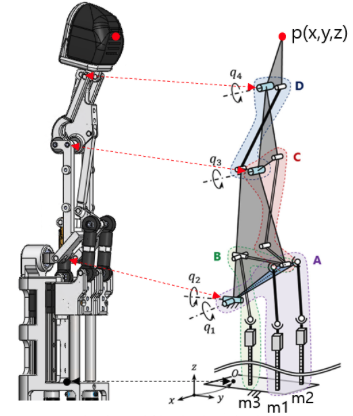
\[Definition of each variable and coordinate system location\]
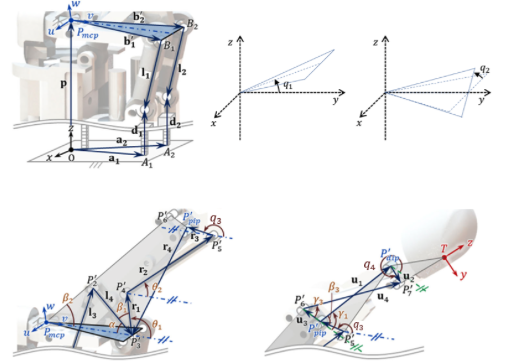
\[Coordinate system of angle q1, q2, q3, q4\]
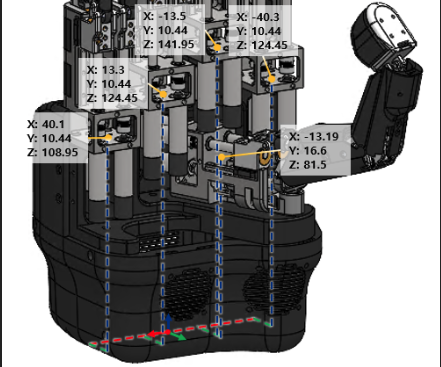
\[Coordinates of each finger origin from the robot hand origin (unit: mm)\]
[**^ Go to First page**](https://help.aidinrobotics.co.kr/en/aidin-hand-tcp/ip-communication-manual#go-to-firstpage-Hand1)
- [Full Manual](https://help.aidinrobotics.co.kr/en/full-manual?hsLang=en)
- [Install Guide](https://help.aidinrobotics.co.kr/en/install-guide?hsLang=en)
[](https://help.aidinrobotics.co.kr/help?hsLang=en)
**(주)에이딘로보틱스, AIDIN ROBOTICS Inc.**
5F, 12-20, Simin-daero 327beon-gil, Dongan-gu, Anyang-si,Gyeonggi-do, South Korea (14055)
영업/마케팅/PR: [sales@aidinrobotics.co.kr](mailto:sales@aidinrobotics.co.kr) | 채용문의: [hr@aidinrobotics.co.kr](mailto:hr@aidinrobotics.co.kr) | 기업문의: [info@aidinrobotics.co.kr](mailto:info@aidinrobotics.co.kr) | Tel: +82-31-360-7926
Copyright @ AIDIN ROBOTICS 2024 I [개인정보처리방침](https://www.aidinrobotics.co.kr/privacypolicy)